End-to-end encryption protects the message in transit. The keyboard sees it before the message exists.
Your keyboard can read every message you type, because it handles your text as plaintext before your messenger's encryption ever gets involved. End-to-end encryption seals a conversation in transit and at rest, but the keyboard sits above that layer: it turns your taps into words and hands the finished text to whichever app is in focus. That means a chat can be perfectly sealed and still be readable by the software drawing your keys.
Key takeaways
- A keyboard app receives your keystrokes as plaintext before any end-to-end encryption is applied, because an input method editor runs above the messenger in the operating system's input pipeline.
- Third-party keyboard privacy on Android is a permissions question as much as a policy question: a keyboard that can reach the network can send what you type somewhere you do not control.
- Keyboard app data collection in chats usually rides on cloud prediction, dictionary sync and personalisation features rather than on hidden keylogging.
- A secure keyboard for private messaging typically keeps its dictionary on the device, avoids the network permission, and ships source code that someone other than the vendor can inspect.
- No messenger's encryption can protect you from a hostile keyboard on your own phone, because device and input security is a separate layer from transport security.
Does my keyboard read my messages before encryption?
Possibly yes, and the reason is architectural rather than scandalous. When you type in a chat app, the operating system routes your input through the active keyboard, and the keyboard assembles the text before passing it to the app. The encryption that protects that message is applied later, by the messenger, once it has the finished string in hand.
Android's own developer documentation for input methods describes the keyboard as a separate application that the system binds to and that receives text-editing events on behalf of the focused app. That design is what lets you install a different keyboard at all. It also means the keyboard is a legitimate place to observe plaintext, with no exploit required.
There are real limits worth knowing. The input connection an app exposes to a keyboard generally gives it the text around the cursor rather than the whole conversation, and pasted text does not pass through the keyboard at all. So a keyboard is best understood as seeing what you type, not everything your chat contains. For a closer look at what encryption genuinely does and does not cover, see what end-to-end encryption actually protects.
Why does third-party keyboard privacy on Android matter so much?
It matters because the keyboard is the layer every encryption claim quietly assumes is trustworthy. Messenger teams spend enormous effort on protocol design — key agreement, ratchets, authentication — and all of it protects a message from the moment the app hands it to the network. The keyboard is upstream of that moment.
Two things make the Android keyboard position unusually exposed. First, an installed keyboard is a real app with its own process and its own permissions, and language packs, themes and cloud suggestions are ordinary reasons for a keyboard to request network access. Second, people change keyboards casually — a new theme, better autocorrect — without treating it as a security decision. Swapping a keyboard is closer to installing a browser extension than to changing a font.
The practical question is therefore not "is this keyboard evil?" but "what is this keyboard technically able to do, and does it need to?" That is exactly the style of thinking behind a written threat model: name the adversary, name what they can see. Livara publishes a threat model that says who sees what for its own stack; the same discipline applies to the software drawing your keys.
What is an IME, and why does it sit above end-to-end encryption?
An input method editor (IME) is the operating-system component that turns your taps, swipes and voice input into characters and words for whichever app is currently in focus. The virtual keyboard you see is the IME's interface; the IME itself is a service that receives key events and text edits and returns composed text.
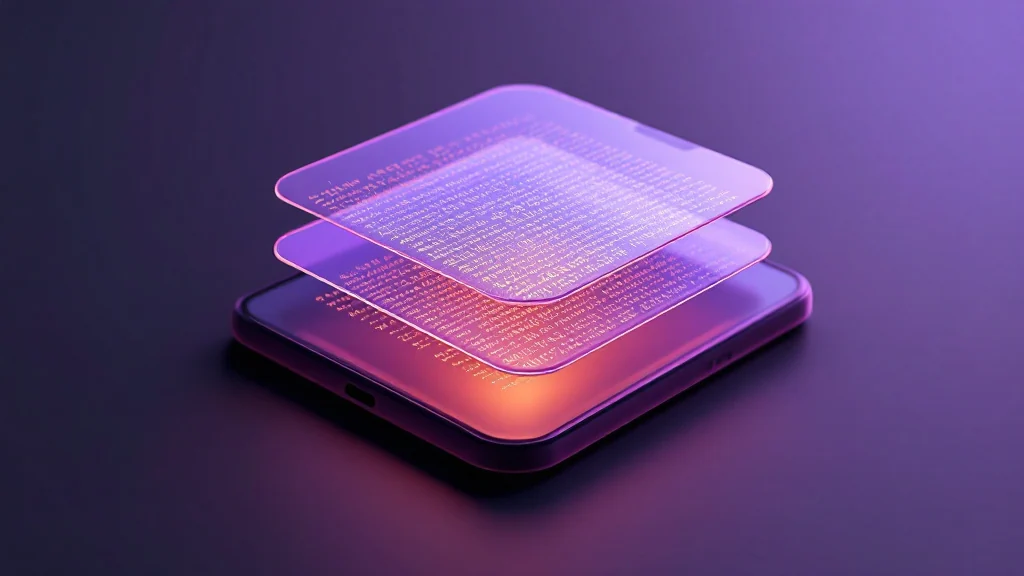
The layering is what matters. Think of a message as travelling through four stages: the keyboard composes it, the app displays it, the messenger encrypts it, the network carries it. Encryption lives in the third stage. The keyboard lives in the first, where the message is still an ordinary string of characters.
That is why a hybrid post-quantum handshake — say, ECDH P-256 combined with ML-KEM-768, one of the parameter sets defined in NIST's FIPS 203 — is a genuinely strong guarantee about the wire that says nothing at all about the first stage. Strong cryptography downstream cannot retroactively protect plaintext upstream.
How does keyboard app data collection reach my chats?
Mostly through features that are useful when they work and revealing when you look closely. Cloud prediction sends context to a server to guess your next word. Personal dictionary sync keeps your nicknames and jargon consistent across devices. "Improve suggestions" style telemetry feeds aggregate typing data back to the vendor. Each of these is a channel out of your device, and each one carries whatever you were typing at the time.
The honest framing cuts both ways. Many major keyboards document these features openly in their privacy policies and offer on-device alternatives, and a great deal of this data is genuinely used to fix autocorrect rather than to read your messages. But the pipeline is the same pipeline: the keyboard that finishes your search query also finishes your private message, and nothing about the second use is technically different from the first.
There is a limit to how much you can fix from inside a chat app. A messenger can choose not to log your messages, and Livara's protocol design does exactly that for direct and group conversations — but it cannot stop an app you installed from observing your typing before the message exists. For a broader checklist of what to demand from any messenger, the 12 questions to ask of a secure messaging app pairs well with this one.
What does Gboard privacy look like in private messages?
Gboard is Google's keyboard, and Google publishes privacy documentation that separates features processed on the device from features that use Google's servers. Which side you land on depends on your settings and on which features you have enabled — cloud-based suggestions, personalisation and voice typing are the usual suspects.
The useful takeaway is not a verdict on one brand. It is that the same keyboard can be comparatively private or comparatively chatty depending on configuration, and that the configuration is yours to change. If a keyboard offers a mode that keeps prediction and voice recognition on the device, turning it on reduces the number of copies of your typing that exist outside your phone.
Be sceptical of reassurance in either direction. "It's just for autocorrect" and "it's definitely spying" are both claims about intent, and intent is not verifiable from the outside. What is verifiable is capability — permissions, network access, whether the source is published — and capability is what you can act on.
What makes a secure keyboard for private messaging?
A short list of properties does most of the work:
- No network permission. On Android you can inspect an app's permissions in system settings. A keyboard that cannot open a socket cannot upload what you type, whatever its privacy policy says.
- On-device dictionaries and prediction. Personalisation that never leaves the phone still gives you autocorrect without creating an off-device record.
- Published source. Open code is not automatically safe, but it is checkable, which is more than a marketing page offers.
- No clipboard harvesting and no "share what you type" features. These turn a keyboard into a general-purpose reader of your text rather than a tool for entering it.
- A vendor with a reason to be accountable. Keyboards shipped by the platform vendor are updated through the same channel as the operating system, which is a different trust story from a one-off download.
State the limits plainly, too. Removing the network permission does not make a keyboard trustworthy forever — a later update, a platform change, or a pre-installed keyboard you cannot remove all reshape the picture. And on Livara, the transport is not the weak link: direct messages use the LVR1 hybrid post-quantum double ratchet, groups use LGS1 sender keys sealed inside pairwise LVR1 envelopes, and call media is protected by WebRTC DTLS-SRTP, which is not post-quantum. Group membership is managed on the server rather than agreed between members, and the protocols have not been independently audited. The keyboard sits outside all of it.
How do I pick the best keyboard for privacy on Android?
Work from capability to convenience, not the other way round.
Start with permissions. Open the app's page in Android settings and look for network-related permissions; if a keyboard has them, ask what feature needs them and whether you would miss it. Then look at the settings inside the keyboard itself: cloud sync, personalisation, "improve for everyone" toggles, and voice input that routes audio off-device are the usual places data leaves.
Prefer keyboards that stay useful offline. If prediction and correction still work in airplane mode, the on-device path is doing real work rather than acting as a fallback. Prefer projects whose source is published, and prefer builds distributed by the platform vendor or by a project with a public release history over anonymous repackaged downloads.
Finally, adjust your habits for the genuinely sensitive cases. Pasting text into a field bypasses the IME entirely, because pasted content arrives through the clipboard rather than through keystrokes — a small, real workaround for the rare message or recovery phrase you would rather not have touch the keyboard at all. It does not scale to everyday conversation, which is why the choice of keyboard still matters.
Do you still need a private messenger if your keyboard is safe?
Yes. Input security and transport security are different layers, and weakening either one is enough to expose a conversation. A trustworthy keyboard on an unencrypted messenger leaves your messages readable in transit. A sealed messenger on a hostile keyboard leaves them readable on the device.
The stack is worth naming in order, because each layer fails differently. Your device and its operating system decide whether anything on the phone can read other apps' data. Your keyboard decides what happens to the text you enter. Your messenger decides what happens once the text leaves the app. Livara's contribution is the third layer: end-to-end encryption for direct and group messages, and published SHA-256 checksums for the Android build so you can check the APK yourself in the Proof Lab. Those checksums and the published protocol design are not a substitute for outside scrutiny — no independent third party has reviewed the stack — so treat them as checkable, not as confirmation.
It is equally worth stating where that protection stops. Livara's channels are public broadcast streams by design — one author publishing to an unbounded audience — and they are deliberately not end-to-end encrypted so that reported content can be acted on and abusive channels removed. Private conversations are a different thing from a broadcast surface, and the two should never be described the same way. If you want to see how the whole stack compares against alternatives, including the places where it comes off worse, the comparison page is written to be read critically.
Frequently asked questions
Can a keyboard read my messages if the chat app is end-to-end encrypted?
It sees the text you type, because the keyboard handles it as plaintext before the app encrypts anything. Encryption begins once the messenger has composed a protocol message — later than the keyboard's involvement, and no protocol design can reach back and cover it.
Is Gboard safe for private messages?
It depends on which features you enable. Google separates on-device processing from features that use its servers; cloud suggestions, personalisation and voice typing are the ones that typically send data off the phone. Check your current settings rather than relying on a general reputation.
Can I stop a keyboard from collecting what I type?
Partly. Revoke permissions, disable cloud sync and personalisation, choose a keyboard that works offline, prefer builds with published source. You cannot verify intent, and you cannot override a pre-installed keyboard. Controlling capability is the realistic goal.
Does pasting text bypass the keyboard?
Yes. Pasted content arrives through the clipboard rather than as keystrokes, so the active keyboard never composes it. That makes paste a genuine workaround for a one-off sensitive string such as a recovery phrase, though it is impractical for ordinary conversation.
What is the best keyboard for privacy on Android?
There is no single winner, but the criteria are stable: no network permission, on-device dictionaries and prediction, published source, no clipboard harvesting, and updates delivered through a channel you trust.
Sources
- NIST, FIPS 203: Module-Lattice-Based Key-Encapsulation Mechanism Standard (ML-KEM) — the parameter sets referenced for ML-KEM-768.
- Android Developers, "Create an input method" (IME) documentation — describes the input method service the system binds to and the input connection that carries text-editing events to and from the focused app.
- Google, Gboard privacy documentation — sets out which keyboard features are processed on the device and which use Google's servers.